Age of Empires II: Definitive Edition
Your build order, step by step, on top of the game.
BO Coach is an overlay that reads your screen, follows the build order you picked, adapts when you stray from it and tells you where to put every villager. So you can practice openings without a guide open on another screen.
Free, open source beta · Windows 10 or 11 · tested at 1920×1080
Heads up: the website is in English, but the desktop app is still in Spanish. An English version of the app is on the roadmap. It already reads the game in English.
How it works
1. It reads the screen
Twice per second it looks at the game's HUD: clock, resources, villagers on each resource, population, the production queue and the game's notifications ("House Built", "Villager Created").
2. It follows your build order
It knows which step you did, which one is next and what fell behind. If you do something early or run late, it adjusts instead of getting stuck.
3. It tells you what to do
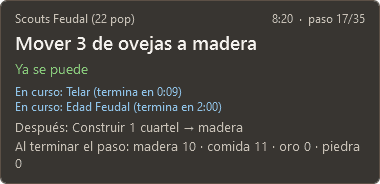
How many villagers to put on each resource now and when the step ends, how long until the next age click, and reminders next to your mouse: out of houses, idle town center, idle villagers.
No cheating: it only looks at the screen, like a friend sitting next to you. It doesn't read the game's memory, doesn't inject code and doesn't send keys or clicks.
Try it right here
The build orders the app ships with, simulated in your browser with the same engine that runs in the app: every step, when it happens and where it gets stuck.
Loading the examples…
What else it does
- A lightweight overlay on top of the game that doesn't take your clicks: about 60 MB of RAM and under 2% CPU, measured on a 4-core i5 from 2014 (much less on a current PC).
- A build order editor with a simulated preview: see when you reach Feudal before you play.
- Imports guides from buildorderguide.com into the app's format.
- A web library to search, vote and share build orders, which open straight in the app.
- Record a game and replay it to check what the coach saw at each moment.
This isn't the final version
BO Coach works, but there's a lot missing, and what improves it most is games from other players. See what it does today, what it can't do yet, what's coming and how you can help.
See the roadmapDownload and get started
- Get the latest version from GitHub and unzip it anywhere. There's nothing to install: .NET comes inside.
- Open
BoCoach.exe. Since it isn't signed, Windows may warn that it's an unrecognized app: click More info and Run anyway. - Follow Primeros pasos (first steps), which opens by itself the first time: you connect your website account and install the HUD mod, which lets the app calibrate itself.
- Play. The coach starts by itself with the game and picks the build order for your civ on the loading screen, or you can pick one from your list. The overlay shows up at the top right of the game.
Support the project
BO Coach is free and open source. If it helps you, you can buy me a coffee: that pays for the domain and the website, and every contribution is logged here, in plain sight, against the goals below.
Loading…
How it's built
- Desktop app
- C# .NET 10 and WPF, with Windows OCR and custom templates for the HUD's numbers.
- Engine
- Pure C# logic with no Windows dependencies: planner, build order tracking and economy, with over 300 tests.
- Website
- Next.js on Vercel and Supabase (Postgres with row-level permissions, accounts with Discord and Google).
- One engine
- The website simulates build orders with the same engine as the app, compiled to WebAssembly.
The code is on GitHub under the MIT license.